Back-to-School: Why a Dedicated Camera Can Help Teachers

For many teachers, a smartphone seems like the easiest way to record a lesson.
It is small, familiar, and always available.
But recording a full class with a phone can quickly become inconvenient.
You may need to keep the phone positioned at the correct angle for 30, 45, or 60 minutes. At the same time, your phone may also be needed for checking notes, responding to messages, viewing teaching materials, or joining another online activity.
A dedicated camcorder can make this workflow simpler.
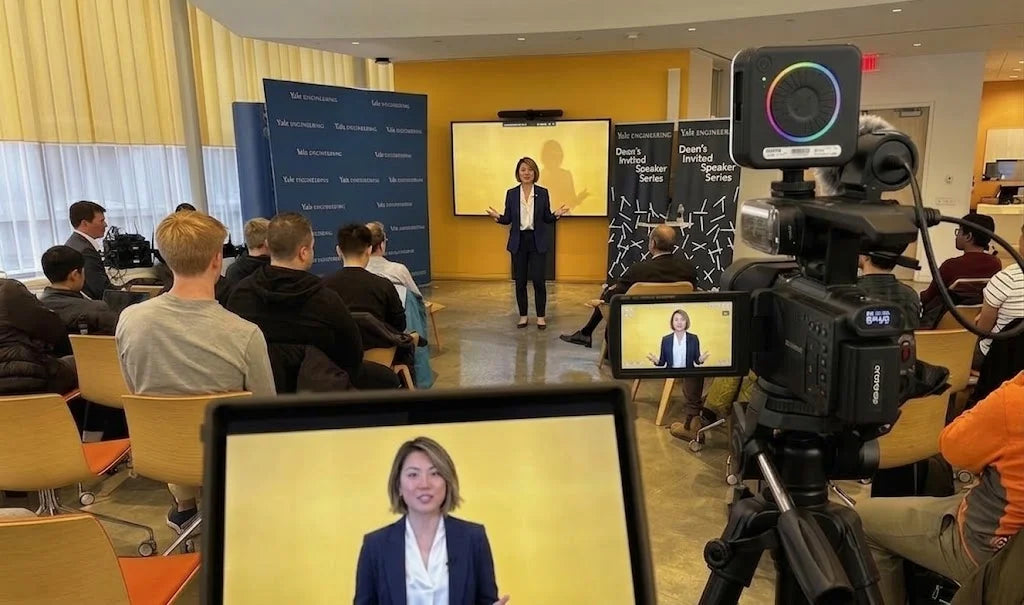
You can place it on a tripod, set the framing once, and leave it recording while you teach. Optical zoom gives you more flexibility when the camera is placed farther away, while a rotatable screen lets you check what is being recorded.
A dedicated camera can also be connected to a computer and used as a USB webcam, making it useful for online classes and video meetings as well as recorded lessons.
For teachers, this can create a simple setup for:
- Online classes
- Recorded lectures
- Course videos
- Teaching demonstrations
- Tutorials
- Live lessons
- Educational YouTube videos
- Classroom recording
The goal is not to choose the camera with the biggest specification list.
The goal is to find a cost-effective camera that fits the way you actua
What Should Teachers Look for in a Cost-Effective Camera?
For online teaching and lesson recording, teachers can focus on a few practical features:
- Autofocus: Keeps the image clear while you move.
- Long Recording: Suitable for recording a complete class or lecture.
- Recording While Charging: Helps support longer sessions.
- Touchscreen Controls: Makes the camera easier to operate.
- Rotatable Screen: Lets you check the framing while recording.
- Optical Zoom: Helps adjust the view when the camera is farther away.
- External Microphone: Gives you more options for clearer audio.
- USB Webcam: Lets you connect the camera to a computer for online teaching.
These features are more relevant to everyday teaching than simply choosing a camera based on resolution alone.
Three Cost-Effective Cameras for Teachers
Before looking at each camera in detail, here is a quick comparison:
| Feature | ORDRO Z88 | ORDRO XV80 | ORDRO AC5 |
|---|---|---|---|
| Positioning | Cost-effective entry option | Upgrade option | Upgrade option |
| Best For | Online classes & course recording | More flexible course recording | Teaching & live classes |
| Video | 4K UHD | Up to 5K | Up to 5K |
| Optical Zoom | 10× | 12× | 12× |
| Additional Zoom | Up to 120× digital | Up to 40× hybrid | Up to 100× digital |
| Autofocus | ✔️ | ✔️ | ✔️ |
| Touchscreen | 3.0" | 3.5" | 3.5" |
| Rotatable Screen | ✔️ | ✔️ | ✔️ |
| External Microphone | ✔️ | ✔️ | ✔️ |
| Record While Charging | ✔️ | ✔️ | ✔️ |
| USB Webcam | ✔️ | ✔️ | ✔️ |
| Best Choice | First dedicated camera | More recording flexibility | Recording + live teaching |
Zoom figures include digital or hybrid zoom depending on the model. Optical zoom is the more useful specification when choosing a camera for distance framing.
1. ORDRO Z88: A Cost-Effective Camera for Getting Started

The ORDRO Z88 is a practical starting point for teachers who want a dedicated camera for online classes and lesson recording.
It combines 4K video recording, 10× optical zoom, autofocus, a 3-inch IPS touchscreen, a rotatable screen, and external microphone support. The product page also includes a webcam mode for use with a computer.
The Z88 is especially convenient for teachers who prefer simple controls. Its touchscreen makes basic operation straightforward, while the rotatable display helps you check your framing when recording yourself. The 10× optical zoom also gives you more freedom to position the camera farther from your teaching area.
Because it focuses on the features most teachers need for everyday recording, the Z88 is the natural cost-effective camera choice for getting started.
Best for: Teachers looking for a simple first camera for online teaching and recorded lessons.
2. ORDRO AC5: A Flexible Upgrade for Teaching and Live Classes

The ORDRO AC5 is designed for educators who want one camera that can handle both recorded lessons and live teaching.
It supports multiple video modes, including 5K/30fps and 4K/60fpsalong with 12× optical zoom and a 3.5-inch IPS touchscreen. The AC5 also includes autofocus functions such as AF-L focus lock and supports Type-C connectivity.
The 12× optical zoom is useful when the camera needs to be placed farther away, while the larger touchscreen and rotatable screen make it easier to monitor your shot during self-recording.
The AC5 can also connect to a computer via USB and work as a webcam, giving teachers another way to use the same camera for Zoom classes, live lessons, and other online teaching applications.
Best for: Teachers who want a flexible camera for recorded courses, online classes, and live content.
3. ORDRO XV80: An Upgrade for More Recording Flexibility

The ORDRO XV80 is a good step up for teachers who want more recording options as their content needs grow.
It supports up to 5K/30fps and 4K/60fps, along with a 12× optical zoom and a Sony CMOS sensor. Its 3.5-inch IPS touchscreen also provides a larger display for checking your framing and camera settings. The camera supports external SD cards up to 512GB and uses Type-C connectivity.
For teachers who regularly record longer lectures, online courses, tutorials, or classroom content, these features provide more flexibility than a basic setup.
The XV80 can also be connected to a computer via USB and used as a webcam, making it possible to use the same camera for recorded lessons and online teaching.
Best for: Teachers who want to upgrade their recording setup and create more course content.
A Simple Cost-Effective Camera Setup for Teachers
You do not need a complicated studio to start recording online lessons.
A practical setup can be:
Camera + Tripod + External Microphone + Computer + Lighting
Place the camera at a comfortable distance and use optical zoom to adjust the framing.
Turn on autofocus so the camera can maintain clear focus as you teach.
Use the rotatable screen to check your position before recording.
Connect an external microphone when clearer voice recording is important.
For longer lessons, connect the camera to power so you can continue recording while charging.
When you need to teach through a computer, connect the camera by USB and use it as a webcam.
This same setup can be used throughout the school year for recorded lectures, online courses, tutorials, demonstrations, and live classes.
Teacher Camera Checklist for the New School Year
Before choosing a camera for online teaching, ask:
Does it have autofocus?
Can it record a full class or lecture?
Can it record while charging?
Are the controls easy to use?
Can I see myself while recording?
Does it have optical zoom?
Can I connect an external microphone?
Can I use it as a USB webcam?
A camera that meets these practical needs can be a better investment than one chosen only for its highest resolution.
Final Takeaway
A good teaching camera does not need to be complicated.
For teachers returning to school and preparing for a new year of online teaching, the right cost-effective camera should make recording easier, more flexible, and more convenient.
The ORDRO Z88 is a practical entry option for teachers who want the essential features for online classes and recorded lessons.
The ORDRO AC5 is a flexible option for educators who want to combine recorded courses, online classes, and live teaching.
The ORDRO XV80 is an upgrade choice for teachers who want more recording flexibility, higher-resolution options, and greater storage capacity.
The best choice ultimately depends on your teaching workflow.
Choose the camera that gives you the features you need for every lesson—not simply the biggest specification list.
FAQ: Cost-Effective Cameras for Online Teaching
What is a cost-effective camera for online teaching?
A cost-effective camera for online teaching is one that provides the features teachers actually use—such as autofocus, long recording, recording while charging, easy controls, optical zoom, external microphone support, and USB webcam connectivity—without adding unnecessary complexity.
Is a camera better than a smartphone for recording online classes?
A smartphone can work well for occasional recordings. However, a dedicated camcorder can be more convenient for regular lessons because it can stay on a tripod, provide optical zoom, offer a rotatable screen for monitoring, and remain available while your phone is used for other tasks.
What features are most important for teachers?
Autofocus, long recording time, recording while charging, simple touchscreen controls, a rotatable screen, optical zoom, external microphone support, and USB webcam connectivity are some of the most practical features for online teaching.
Can these cameras be used as webcams?
Yes. The Z88, XV80, and AC5 can be connected to a computer via USB and used as webcams, allowing teachers to use them for online classes, video meetings, and live teaching.
Which ORDRO camera is best for teachers on a budget?
The ORDRO Z88 is the most natural starting point for teachers looking for a cost-effective camera. It combines 4K recording, 10× optical zoom, touchscreen controls, webcam functionality, and external microphone support.
Which camera should I choose for recording online courses?
For teachers who want a straightforward setup, the Z88 is a good entry option. The XV80 is better suited to users who want more recording flexibility, while the AC5 is useful for educators who want to combine recorded lessons with live teaching.
Is optical zoom useful for teaching?
Yes. Optical zoom is useful when the camera needs to be placed farther away from the teacher. The Z88 offers 10× optical zoom, while the XV80 and AC5 offer 12× optical zoom.
Can I record a long lesson while the camera is charging?
Yes. All three models can be used while connected to power, which is useful when recording longer teaching sessions.
Share:
World Photography Day: Affordable Cameras for Everyday Moments
Best Budget Camcorder: A Cost-Effective Canon & Sony Alternative