
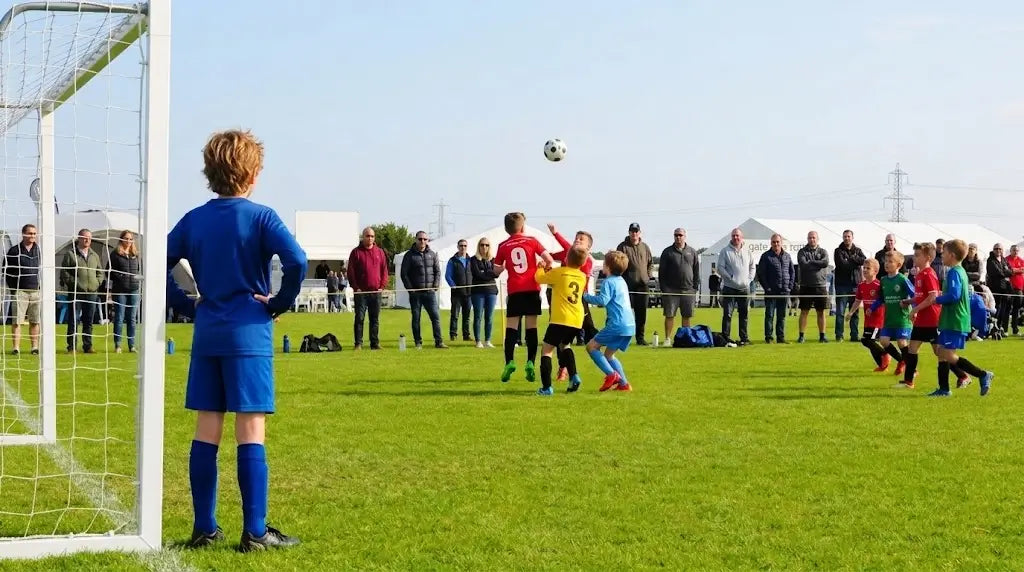
Best Camera for Recording Kids’ Sports in 2026: A Parent’s Buying Guide

A winning goal, a first home run, a perfectly timed serve, or a championship celebration may last only a few seconds—but families often want to keep those memories for years.
Smartphones are convenient when the action is nearby. However, once your child moves across a soccer field, baseball diamond, running track, or school gym, phone footage can quickly become distant, shaky, or unclear.
For most parents recording from the sidelines, the ORDRO XV80 is our top family sports camera recommendation for 2026. Its 12× optical zoom, autofocus options, 4K 60fps recording, slow-motion mode, large 3.5-inch touchscreen, and camcorder-style handling make it especially suitable for outdoor sports, school competitions, and family events.
This guide explains what parents should look for in a sports camera, where the XV80 performs best, and when a lower-priced Z36 or a low-light-focused AC3 may be more appropriate.
Quick Answer: Which ORDRO Camera Is Best for Sports?
|
Your Main Need |
Recommended Camera |
Why |
|
Recording soccer, baseball, football, or track from the sidelines |
12× optical zoom, autofocus, 4K 60fps, slow motion |
|
|
Recording indoor or outdoor family sports on a limited budget |
Affordable 4K entry-level camcorder |
|
|
Recording evening games or poorly lit locations |
IR night vision and external IR light kit |
|
|
Recording school performances and award ceremonies |
Optical zoom, large screen, external microphone support |
|
|
Capturing sports technique for later review |
Slow motion, pre-recording, focus controls |
Our recommendation
Choose the ORDRO XV80 when your child is often far from your seat or position and you need true optical zoom.
Choose the Z36 when price and ease of entry matter more than long-distance optical reach.
Choose the AC3 when you regularly record evening activities, camps, or dark environments where infrared night vision is more useful than optical zoom.
Table of Contents
1. Why smartphones struggle with youth sports
2. What makes a good family sports camera
3. Why the ORDRO XV80 is our top choice
4. Which sports can you record with the XV80?
5. XV80 versus smartphone
6. When to choose the Z36 or AC3
7. Sports recording tips for parents
8. Frequently asked questions
Why Smartphones Often Struggle With Youth Sports

Modern smartphones can produce excellent video at close range. The difficulty begins when the subject is on the other side of a field, court, stage, or track.
Parents frequently encounter four problems.
Digital zoom reduces detail
Most smartphones rely heavily on digital zoom. Digital zoom enlarges part of the image rather than physically bringing the subject closer through the lens.
As magnification increases, faces, jersey numbers, and smaller movements can lose detail.
A camera with optical zoom changes the lens focal length to bring distant action closer before the image is recorded. This is why optical zoom is especially valuable for soccer, baseball, football, athletics, and outdoor school events.
Touchscreen controls are difficult during fast action
A phone is designed for many purposes, not only recording sports. Switching between zoom levels, exposure, focus, messages, calls, and notifications can become distracting during an important moment.
A dedicated camcorder gives parents physical recording and zoom controls, a stable grip, and a screen designed for continuous framing.
Phones are needed for other tasks
During a tournament or family trip, your phone may also be used for navigation, team messages, tickets, calls, photos, and mobile payments.
Using a separate sports camera helps preserve phone battery and storage while allowing the camera to remain ready for the next game.
Long handheld clips can become uncomfortable
Holding a flat smartphone at arm’s length for an entire match is tiring. A camcorder-style body provides a more natural grip and dedicated zoom controls for longer recording sessions.
What Makes a Good Camera for Recording Kids’ Sports?
The best family sports camera is not necessarily the most expensive camera. It is the camera that helps a parent follow action, frame distant subjects, start recording quickly, and review footage without complicated professional settings.
The following features matter most.
Optical zoom
Optical zoom should be one of the first specifications parents check.
For large playing areas, such as soccer fields and baseball diamonds, optical zoom allows you to remain outside the field while still capturing closer views of the player.
The XV80 provides 12× optical zoom, along with up to 40× hybrid zoom. For best image quality, use the optical zoom range first and treat higher hybrid magnification as an occasional option.
Reliable autofocus and focus control
Sports subjects move quickly and unpredictably. A camera needs to regain focus as the player changes position.
The XV80 supports:
· Automatic focus
· Focus lock
· Half-press photo-button focusing
· Manual focus
Automatic focus is the easiest choice for most parents. Focus lock can be useful when action remains in one area, while manual focus gives more control when fences, nets, spectators, or other objects interfere with autofocus.
Higher frame-rate recording
A higher frame rate can make fast movement appear smoother and gives editors more flexibility when slowing footage down.
The XV80 supports:
· 5K at 30fps
· 4K at 60fps or 30fps
· 2.7K at 60fps or 30fps
· 1080p at 60fps or 30fps
For most outdoor sports, 4K 60fps is a practical starting point because it balances detail and smoother motion.
For longer events where storage space matters, 1080p 60fps may be more manageable.
Stabilization and comfortable handling
Parents rarely carry professional tripods or cinema rigs to every game. A practical family sports camera should be comfortable to hold and should help reduce ordinary handheld shake.
The XV80’s camcorder body, physical controls, and anti-shake support make it easier to follow action than holding a phone with two fingers.
For the most stable results during long matches, a monopod or tripod is still recommended.
Pre-recording
One of the XV80’s most useful sports features is pre-recording.
Sports moments do not always wait for the parent to press the record button. A goal, swing, jump, or finish may happen unexpectedly.
Pre-recording helps retain footage from immediately before regular recording begins, reducing the chance of missing the start of an important moment.
Slow motion
Slow-motion footage is useful for more than dramatic replays.
Families and coaches can use it to review:
· A baseball or softball swing
· A soccer kick
· A basketball shot
· A tennis serve
· A gymnastics movement
· A sprinting start
· A volleyball spike
It can also turn an ordinary family sports video into a more engaging highlight reel.
Continuous shooting for still photos
When a player is moving quickly, a single photo can easily capture the wrong expression or position.
Continuous shooting allows a short sequence of images to be taken, improving the chance of capturing the most meaningful frame.
A screen that is easy to see
The XV80 includes a 3.5-inch IPS touchscreen with a 1280 × 720 display.
The larger screen helps parents and grandparents:
· Check whether the player is in frame
· Review clips between games
· Adjust settings without navigating a tiny display
· Confirm focus before recording
· Operate the camera more comfortably outdoors
Why the ORDRO XV80 Is Our Top Family Sports Camera

The XV80 is designed for people who want more reach and control than a smartphone without moving into a complicated interchangeable-lens camera system.
Its strongest advantage for family sports is not one isolated specification. It is the combination of optical zoom, manageable controls, flexible focus, useful video modes, and an accessible screen.
1. The 12× Optical Zoom Brings Distant Action Closer
At a soccer match, parents may be positioned far behind the touchline. At a baseball game, the player could be across the outfield. During track events, athletes move rapidly between distant parts of the venue.
The XV80’s 12× optical zoom helps parents capture a more useful composition without walking into restricted areas or relying entirely on digital enlargement.
This makes it especially suitable for:
· Soccer and football sidelines
· Baseball and softball fields
· Track and field events
· Tennis matches
· Outdoor school competitions
· Graduation ceremonies
· School concerts and performances
How to use the zoom more effectively
Avoid staying at maximum zoom for the entire game.
Start with a wider view to locate the player, then zoom in gradually. Sudden zoom movements can make footage difficult to watch.
When the action becomes unpredictable, zoom out slightly and leave room around the subject. A wider frame is easier to crop later than footage in which the player has moved outside the image.
2. 4K 60fps Is a Strong Setting for Fast Movement
Although the XV80 can record up to 5K at 30fps, the highest resolution is not automatically the best choice for every sports event.
For fast movement, 4K 60fps may be the more useful setting because it provides smoother motion while retaining high resolution.
Use 5K 30fps when:
· The movement is slower
· You want maximum detail
· You plan to crop the footage
· Storage space is not a concern
Use 4K 60fps when:
· Recording soccer, basketball, tennis, or running
· Following fast movement
· Creating smoother highlight videos
· Planning mild slow-motion edits
Use 1080p 60fps when:
· Recording an entire match
· You need smaller file sizes
· You want faster editing and sharing
· Your computer struggles with 4K or 5K files
3. Autofocus, Focus Lock, and Manual Focus Offer More Control
Sports venues often contain visual obstacles.
A chain-link fence may sit between the camera and a baseball player. Spectators may walk through the frame. A goal net or railing may distract the autofocus.
The XV80 gives parents several focusing options.
Automatic focus
Best for general family recording and changing distances.
Focus lock
Useful when the player stays within a predictable area, such as a basketball free-throw line, gymnastics station, or home plate.
Manual focus
Useful when the camera repeatedly focuses on a fence, net, or foreground object instead of the player.
Parents do not need to use manual focus at every game. However, having the option can solve problems that a simple fixed-focus budget camera cannot.
4. Slow Motion Helps Preserve and Review Key Moments
A sports video becomes more meaningful when families can clearly see the movement that made the moment special.
Slow motion can highlight:
· The instant the ball leaves the bat
· A goalkeeper’s save
· A gymnast’s landing
· A volleyball block
· A basketball shot
· A child crossing the finish line
For coaches and young athletes, slow-motion clips may also help with basic technique review. The XV80 is not a professional motion-analysis system, but it gives families a practical way to review important actions.
5. Pre-Record Helps When the Action Starts Unexpectedly
Parents often press record a second too late.
The camera may start after the ball has already been kicked or after the runner has left the starting line.
Pre-recording is particularly useful during:
· Penalty kicks
· Baseball at-bats
· Race starts
· Gymnastics routines
· Award announcements
· Graduation name calls
This feature makes the XV80 more suitable for unpredictable family events than a camera that only begins preserving footage after the record button is pressed.
6. The Large Touchscreen Is Easier for Parents and Grandparents
Youth sports are often recorded by different family members. A camera should not require every person to learn a professional menu system.
The 3.5-inch touchscreen provides more space for framing and reviewing footage than many ultra-compact cameras.
This is especially valuable for:
· Users with larger hands
· Older family members
· Outdoor operation
· Reviewing player numbers and facial detail
· Checking focus between events
Physical buttons remain available for important controls, so the user is not entirely dependent on the touchscreen.
7. External Microphone Support Improves More Than Game Audio
The XV80 includes a built-in stereo microphone and a 3.5mm microphone input.
An external microphone can be useful for:
· Post-game interviews
· Coach comments
· Team celebrations
· School announcements
· Award ceremonies
· Family narration
· Graduation speeches
During a game, position the camera carefully to avoid capturing excessive wind or nearby crowd noise. A windscreen or directional microphone may provide cleaner audio in outdoor conditions.
8. Storage Support Makes It Suitable for Tournaments
Sports tournaments can produce many hours of footage.
The XV80 supports SD cards up to 512GB, provided the card meets the required speed standard. A U3, Class 30, or V30-rated card is recommended for high-resolution recording.
Before an event:
· Format the card in the camera
· Check remaining storage
· Record a short test clip
· Carry a backup card
· Transfer important footage after the event
Recording everything in 5K will consume storage faster than 1080p or 4K. Choose the resolution according to the length of the event and how the footage will be used.
Which Sports Are Best Suited to the XV80?

|
Sport or Event |
Why the XV80 Is a Good Fit |
Suggested Starting Setting |
|
Soccer |
12× optical zoom helps follow players across a large field |
4K 60fps |
|
Baseball or softball |
Optical reach, pre-recording, slow motion |
4K 60fps |
|
Basketball |
Autofocus and smoother frame rate for faster movement |
1080p or 4K 60fps |
|
Volleyball |
Slow motion helps preserve serves, spikes, and blocks |
4K 60fps |
|
Tennis |
Optical zoom and focus control from spectator areas |
4K 60fps |
|
Track and field |
Wide-to-telephoto flexibility and pre-recording |
4K 60fps |
|
Gymnastics |
Focus lock and slow motion for routines |
4K 60fps |
|
School concerts |
Optical zoom and external microphone support |
4K 30fps |
|
Graduation |
Zoom, large screen, continuous recording |
4K 30fps |
|
Outdoor family events |
Portable camcorder handling and flexible recording modes |
1080p or 4K |
ORDRO XV80 vs Smartphone for Recording Sports
|
Feature |
Smartphone |
ORDRO XV80 |
|
True optical zoom for distant action |
Usually limited |
12× optical zoom |
|
Dedicated zoom controls |
Limited |
Yes |
|
Camcorder-style grip |
No |
Yes |
|
Focus options |
Mostly automatic |
Auto, focus lock, manual |
|
Pre-recording |
Rare |
Supported |
|
Slow-motion mode |
Varies |
Supported |
|
External microphone input |
Adapter may be required |
3.5mm input |
|
Expandable storage |
Usually no |
Up to 512GB SD card |
|
Separate battery from phone |
No |
Yes |
|
Designed for long-form recording |
Not primarily |
Yes |
A smartphone remains useful for quick clips, close-range celebrations, and immediate social sharing.
The XV80 becomes more valuable when the player is far away, the event lasts longer, or the parent needs dedicated recording controls.
Is the XV80 Better Than an Action Camera for Youth Sports?
It depends on where the camera will be positioned.
Choose the XV80 when:
· Recording from the sidelines or spectator area
· The subject is far away
· Optical zoom is important
· You want to follow one player
· You need a larger screen and traditional camcorder handling
Choose an action camera when:
· The camera will be worn by the athlete
· You need a very wide field of view
· The camera may be exposed to water or impacts
· You want first-person footage
The XV80 is a sideline family sports camera, not a helmet-mounted or waterproof action camera.
Honest Limitations to Consider
No entry-level camera is ideal for every sports situation.
Before choosing the XV80, consider the following:
· Maximum zoom requires steadier handling; a tripod or monopod will improve long-distance footage.
· Indoor sports lighting varies. Very dark gyms may require careful exposure settings.
· Large 4K and 5K files require faster memory cards and more storage.
· An external microphone may be preferable for interviews or important speeches.
· The XV80 is larger than a pocket camera, although its camcorder body is more comfortable for longer recording.
· It is intended for family recording and beginner creators rather than professional broadcast sports production.
These trade-offs are reasonable for families who want optical zoom and flexible video features without investing in a professional interchangeable-lens system.
When Should You Choose the ORDRO Z36 Instead?
The Z36 is the more affordable option for first-time camcorder users.
It is better suited to families who:
· Have a limited budget
· Record sports from relatively close positions
· Mainly need basic 4K video
· Want a lightweight beginner camera
· Do not require 12× optical zoom
The Z36 supports 4K recording, a rotating screen, external microphone accessories, and IR night vision. However, its zoom is digital rather than the XV80’s dedicated optical zoom.
For large soccer fields, baseball diamonds, and distant school stages, the XV80 remains the stronger choice.
For casual family clips and entry-level use, the Z36 may be sufficient.
When Should You Choose the ORDRO AC3 Instead?
The AC3 is the better alternative when low-light and infrared recording are more important than long-distance sports zoom.
Consider the AC3 for:
· Evening outdoor activities
· Camps and nighttime family events
· Low-light exploration
· Paranormal investigations
· Situations requiring an external infrared light
The AC3 includes an IR-focused kit with an external IR light and accessories.
For normal daytime soccer, baseball, tennis, and school athletics, choose the XV80.
For dark locations where visible lighting is limited, the AC3 may be the more appropriate tool.
Best Camera by Family Use Case
|
Family Use Case |
Best Choice |
|
Weekend soccer league |
XV80 |
|
Baseball tournaments |
XV80 |
|
School concerts and graduation |
XV80 |
|
Reviewing sports technique |
XV80 |
|
First low-cost family camcorder |
Z36 |
|
Evening camp or dark outdoor activity |
AC3 |
|
Paranormal or infrared recording |
AC3 |
|
Close-range casual family clips |
Z36 |
|
Long-distance sideline recording |
XV80 |
Practical Sports Recording Tips for Parents
Arrive early and test the camera
Record a short test clip before the game begins. Check focus, exposure, zoom operation, battery, and storage.
Use 4K 60fps for faster action
This is a useful starting point for sports where the subject changes direction quickly.
Do not zoom too tightly
Leave space around the player. Overly tight framing makes it easier to lose the subject.
Use a monopod for long events
A monopod takes up less space than a full tripod and reduces arm fatigue while improving stability.
Avoid constant zooming
Choose a useful framing and follow the action. Repeated zooming can make the final video uncomfortable to watch.
Record short clips when possible
Unless you need the entire match, record important periods and moments. Shorter clips are easier to store, edit, and share.
Use pre-record for predictable key moments
Enable it before penalty kicks, at-bats, race starts, or award announcements.
Capture establishing shots
Before the event, record the field, scoreboard, team warm-up, and family arrival. These clips make a future highlight video feel more complete.
Keep the original audio
Crowd reactions and family voices often become some of the most meaningful parts of the memory.
Back up important footage
After the event, copy the files to a computer or cloud storage rather than leaving the only copy on the memory card.
Key Takeaways
· The ORDRO XV80 is our top ORDRO camera for parents recording youth sports from the sidelines.
· Its 12× optical zoom is the main advantage over smartphones and entry-level digital-zoom cameras.
· 4K 60fps is a practical setting for smoother sports footage.
· Autofocus, focus lock, manual focus, slow motion, and pre-recording provide useful control for unpredictable action.
· The 3.5-inch touchscreen is easier for many parents and grandparents to frame and review.
· The Z36 is a lower-cost alternative for close-range family recording.
· The AC3 is better suited to evening, dark, or infrared-focused activities.
· A tripod or monopod is recommended when recording at longer zoom settings.
Frequently Asked Questions
What is the best camera for recording kids’ sports in 2026?
For parents recording from the sidelines, the ORDRO XV80 is a strong family-focused choice because it combines 12× optical zoom, 4K 60fps recording, autofocus, slow motion, pre-recording, and a 3.5-inch touchscreen.
Is the ORDRO XV80 good for recording soccer games?
Yes. Its 12× optical zoom helps parents follow players across a large field without relying entirely on digital zoom. A monopod is recommended when using longer zoom settings.
Is the XV80 good for baseball and softball?
Yes. Optical zoom helps capture action around home plate, the pitcher’s mound, and the outfield. Pre-recording and slow motion are also useful for at-bats, pitches, catches, and base running.
Is optical zoom better than digital zoom for sports?
Optical zoom generally preserves more detail because the lens magnifies the scene before it is recorded. Digital zoom enlarges a portion of the image and may reduce clarity.
Should I record sports in 5K or 4K?
Use 5K 30fps when maximum detail is the priority and movement is moderate. For faster sports, 4K 60fps is often a better balance of resolution and smoother motion.
Can the XV80 record slow-motion sports videos?
Yes. The XV80 supports slow-motion recording, which can be useful for replaying swings, kicks, jumps, serves, shots, and other fast movements.
Can I connect an external microphone?
Yes. The XV80 has a 3.5mm microphone input and a hot shoe for compatible accessories. An external microphone is useful for interviews, coach comments, ceremonies, and family narration.
How much storage does the XV80 support?
The XV80 supports SD cards up to 512GB. Use a sufficiently fast card, particularly for 4K and 5K recording.
Is the XV80 suitable for grandparents?
The 3.5-inch screen, camcorder-style grip, physical controls, and autofocus make it more accessible than many ultra-small cameras. A short practice session before the event is still recommended.
Is the XV80 a professional sports camera?
The XV80 is designed as a high-value family and beginner camcorder. It provides useful sports features without the cost or complexity of a professional broadcast or interchangeable-lens camera system.
Is the Z36 better for beginners?
The Z36 is less expensive and suitable for basic family recording. The XV80 is the better choice when the player is far away and optical zoom is a priority.
Is the AC3 better for night games?
The AC3 is better suited to infrared and very dark environments. For a normally illuminated evening stadium or court, the XV80 may still be more useful because of its optical zoom. For near-total darkness, the AC3’s IR system is the more relevant feature.
Capture Every Game From the Sidelines
Children grow quickly, seasons end, and important sporting moments may never happen in exactly the same way again.
The ORDRO XV80 helps families record those moments with 12× optical zoom, flexible focus controls, high-resolution video, slow motion, and a large, easy-to-view screen.
Whether you are recording weekend soccer, a baseball tournament, a school championship, or a graduation ceremony, the XV80 gives parents a dedicated way to preserve the action without paying for a professional camera system.
Explore the ORDRO XV80 5K Optical Zoom Camcorder
https://ordro.online/products/ordro-xv80-5k-professional-12x-optical-video-camera-for-tv-interviews
Other options
Choose the ORDRO Z36 for an affordable entry-level family camcorder
Choose the ORDRO AC3 for infrared and low-light recording
https://ordro.online/collections/camcorder/products/camcorder-ac3-ir
Written by the ORDRO Camera Team
Last Updated: July 2026
ORDRO develops accessible cameras and camcorders for families, travelers,
Share:
Best Camera for Recording Family Sports Games in 2026
Best Budget Cameras for Wildlife Photography with IR Night Vision in 2026 for Beginners