
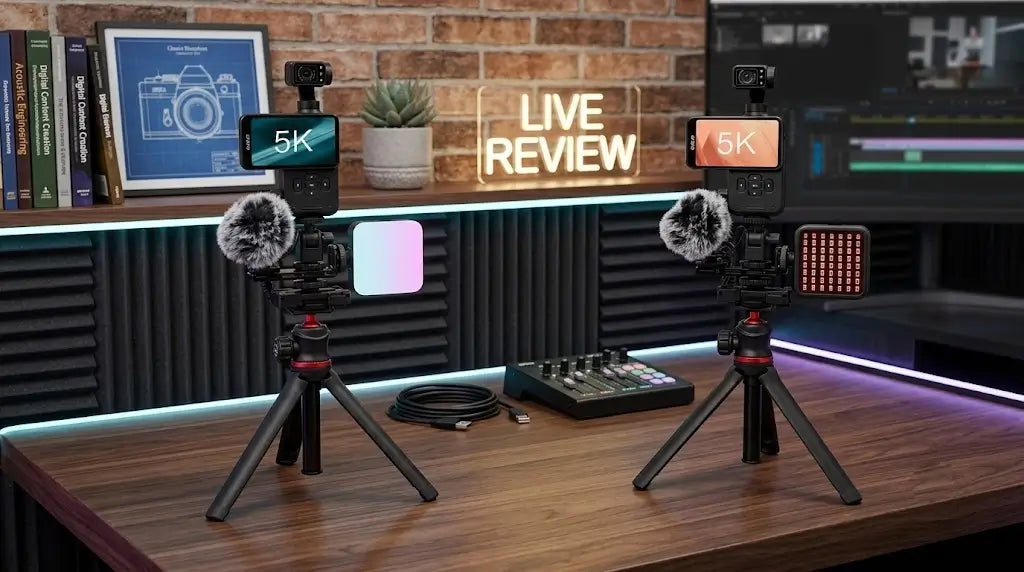

When looking for a portable vlogging camera, high price tags can often be a barrier. Pocket cameras with motorized stabilization usually come at a premium. However, the ORDRO Pocket M5 offers an affordable alternative. It delivers all the core features found in higher-priced pocket cameras—like 3-axis stabilization and tracking—but at a much lower, highly competitive price point.
If you are looking for a high-value, cost-effective pocket camera for travel or daily content creation, here is how to maximize its features for the best results.
Key Features of the ORDRO Pocket M5

1. High-Value Without the Premium Price Tag.
The price is half that of a pocket camera.
The M5 is designed to offer excellent value for money. Creators often believe they need to spend hundreds of dollars to get a camera with a motorized gimbal, a large screen, and smart tracking. The M5 proves that you can get these exact capabilities in a budget-friendly package, making it one of the most cost-effective pocket cameras on the market today.
2. 3-Axis Gimbal Stabilization: Smooth Footage, No Cropping
Most budget cameras rely on electronic image stabilization (EIS), which crops into your video frame and lowers image quality in low light. The M5 includes a physical 3-axis mechanical gimbal. The camera lens physically shifts to counter your hand movements, ensuring your video remains stable.
How to use it: When walking, running, or panning, the mechanical gimbal keeps your footage smooth while maintaining the full wide-angle view. You can also flip the camera upside down for low-angle ground shots without losing clarity.
3. IR Night Vision: True Darkness Recording
Standard pocket cameras often fail in low-light environments, producing grainy, unusable footage. The M5 handles this differently by incorporating a dedicated IR (Infrared) Night Vision mode—a feature rarely seen in this camera category.
How to use it: Turn this mode on when camping, exploring outdoors at night, or recording in unlit rooms. It uses infrared light to capture clear, detailed monochromatic footage in 0-lux (complete) darkness without requiring bulky, expensive external panel lights.
4. 3.5" Touchscreen & Face Tracking: Simple Solo Vlogging
Framing your shots or checking your focus while standing in front of a camera can be a challenge. The M5 addresses this with a spacious 3.5-inch touchscreen display, which is larger than many of its high-priced competitors. Combined with built-in face recognition software, the camera automatically tracks your movements.
How to use it: Mount the M5 to a small desktop tripod and enable face tracking. As you move around a room—whether cooking, unboxing a product, or giving a presentation—the camera shifts automatically to keep you centered in the frame.
5. Compact Portability: 240g Weight & 3-Hour Battery Life
A travel camera needs to be easy to carry. The M5 weighs just 240g, making it light enough to slip into a jacket pocket or a small bag without noticing the weight. Despite its lightweight build, its power management allows for up to 3 hours of continuous recording on a single charge.
Enhancing Your Setup: Solving Audio Challenges with the ORDRO PWM-5

While the M5 delivers stable video at a highly competitive price, great video requires clear audio. Built-in camera microphones face physical limitations when taken outdoors. To match your smooth footage with clear voice recording, we recommend pairing the camera with the ORDRO PWM-5 Wireless Microphone.
This wireless microphone acts as a practical fix for three common outdoor recording issues:
- Eliminating Wind Noise: Recording nature footage on a beach, near a river, or on a windy trail can cause heavy wind distortion on built-in mics. The PWM-5 includes an efficient windshield that filters out ambient air movement, keeping your voice distinct and legible.
- Consistent Volume at a Distance: If you step back from your camera to show a wider view or host a live stream, a built-in mic will sound distant and echoey. Clipping the PWM-5 to your collar maintains a consistent audio level no matter how far you walk from the lens.
- Isolating Your Voice on Busy Streets: When filming a travel vlog in crowded city centers, street markets, or public events, background noise can easily drown you out. The PWM-5 separates your speech from surrounding traffic and chatter so your audience can hear you clearly.
The Ultimate Live Streaming Setup: ORDRO M5 Combo Kits

To get the most out of your M5 for live broadcasting on platforms like TikTok or YouTube, having the right accessory ecosystem is just as important as the camera itself. While the camera and microphone handle the core video and audio, a professional stream also requires stable mounting and adaptable lighting.
There are two specialized bundles designed to give you a complete, ready-to-use streaming studio right out of the box:
1. M5 Vlog Kit (Tripod + RGB Light + Mic)
The Setup: This kit includes the M5 camera, a mini tripod, a mountable RGB light, and a CM100 microphone.
Why it works for Live Streaming: When streaming for extended periods, handheld recording isn't practical. The mini tripod instantly transforms the M5 into a stable desk camera. The included RGB light acts as a crucial key light to ensure your face remains well-lit and separated from the background, or it can be used to add creative color accents to your room. This combination of stable framing, consistent lighting, and clear audio makes it the ideal setup for desktop live streams, product unboxings, or indoor Q&A sessions.
2. M5 IR Combo (Tripod + LN-5 IR Light + Mic)
The Setup: This bundle swaps the standard lighting for the LN-5 Infrared (IR) Night Vision Light, while retaining the stabilizing tripod and CM100 microphone.
Why it works for Live Streaming: If your content involves nighttime outdoor exploration, camping broadcasts, or low-light atmospheric streams, standard LED lights will wash out the background and blind the host. While the M5 features built-in IR capabilities, attaching the external LN-5 IR light significantly extends your night vision range and clarity in complete 0-lux environments. The tripod doubles as an ergonomic handle for walking streams, and the mic cuts through outdoor wind noise, ensuring your audience can see and hear every detail in the dark.
Frequently Asked Questions (FAQ)
Q1: How does the ORDRO Pocket M5 compare to more expensive pocket cameras?
A: The M5 is a very cost-effective product. It comes with the same basic hardware as high-end models, such as a motorized 3-axis mechanical gimbal, face tracking, and a touchscreen, but at a much lower price. In addition, it features infrared night vision, which is not common in other pocket cameras.
Q2: Will the video I record while walking shake?
A: NO. The 3-axis mechanical gimbal automatically calibrates when you power it on. It moves automatically as you walk or hold the device to counteract shake and vibration, providing smooth footage without digital cropping.
Q3: Can I connect an external microphone to the ORDRO Pocket M5?
A: Yes. For clear audio in noisy or outdoor environments, you can easily connect a wireless system, such as the ORDRO PWM-5 wireless microphone. This helps isolate wind noise, crowd noise, and traffic noise, making your voice clearer.
Q4: How long is the battery life during continuous recording?
A: The M5 offers up to 3 hours of continuous recording time on a full charge, sufficient for a full day of daily shooting, travel vlogging, or intermittent video footage capture.
Q5: Is the infrared night vision mode suitable for outdoor use?
A: Yes. The infrared night vision mode is designed for completely dark (0 lux) environments. It allows you to record clear video without any external visible light source when camping at night, observing wildlife, or taking an evening walk.
Share:
📸 Y2K Video Camera: With it, you too can become a video blogger.
ORDRO D27 Y2K Digital Camera: Flip Screen Vlog Camera